Users get 504s. How to prove the portal isn't the problem
Bitrix24 on-premise · ~1,000 employees · DDoS protection in front of the portal · 2026
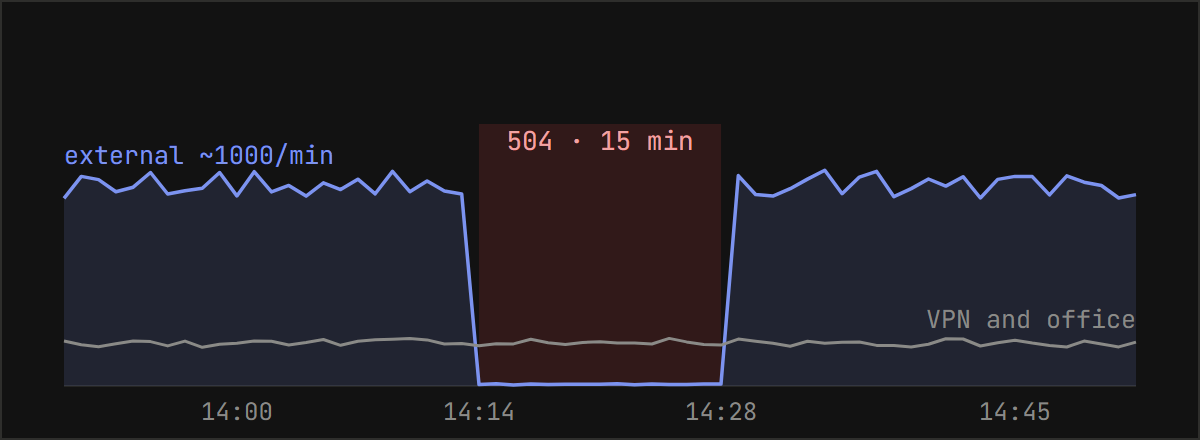
At 14:14 the complaints started: the portal won't load, the browser shows 504 Gateway Timeout. Fifteen minutes later everything worked again on its own. The day before, the same thing had happened, only shorter.
Meanwhile the portal opened fine for me over VPN, no delay at all. So the question wasn't "what broke" but "where". And the answer had to come with numbers. Without them, a conversation with the network team turns into an exchange of opinions, and the next outage runs longer.
Why a 504 doesn't mean the portal is down
On this project there are several hops between a user and the portal: the user's internet connection, a DDoS protection service, the link to the server, nginx on the server, and Bitrix24 behind it. A 504 comes from whichever hop gave up waiting for the next one. nginx returns it when PHP hangs. The DDoS protection returns exactly the same error when its request never reaches the server.
To the user, both look identical. To the business, they're very different. In the first case the portal needs fixing. In the second, touching the portal is pointless or worse: restarting services "just in case" during a network outage only adds downtime.
Below are five checks, in order. All of them run against the nginx log on the portal server and take about 15 minutes together.
Five checks against the nginx logs
1. Did our nginx return the 504? The fastest answer to the main question.
sudo awk '$8==504' /var/log/nginx/access.log | tail -5
Filter on the status field, not with grep "504". Grep will find those three digits in temp file names, tokens and URLs and raise a false alarm. Empty output means something upstream returned the 504.
2. Response times during the incident. Even without 504s, the portal could have been slow.
sudo awk 'substr($4,14,5)>="14:14" && substr($4,14,5)<="14:28" {gsub("]","",$7); print $7}' \
  /var/log/nginx/access.log | sort -rn | head -5
In this log format the seventh field holds the response time; yours may differ. A second or two means the portal was fine. Tens of seconds mean it's the culprit.
3. Requests per minute. Shows whether there was a dip and when it began.
sudo awk '{print substr($4,14,5)}' /var/log/nginx/access.log | uniq -c | tail -20
4. External traffic separately from internal. This is the check that settles it.
sudo awk '$1 ~ /^203\.0\.113\./ {print substr($4,14,5)}' /var/log/nginx/access.log | uniq -c | tail -20
Replace 203.0.113. with the addresses your external traffic arrives from: the DDoS protection, a load balancer or a proxy. Every outside user reaches the server from those addresses. The office and VPN bypass them and come from internal ranges.
If external requests vanished during the incident while internal ones kept flowing, the link is broken, not the portal. That's what a network outage looks like from the inside: the admin on VPN works normally while people outside see 504s.
5. Server resources and limits. The last check rules out "the server was refusing connections".
uptime ; free -m | head -2
nstat -az | grep -E "ListenOverflows|ListenDrops"
cat /proc/sys/net/netfilter/nf_conntrack_count /proc/sys/net/netfilter/nf_conntrack_max
sudo ss -tn state established | wc -l
The number that matters is ListenOverflows. Zero means the incoming connection queue never overflowed: the server accepted everything that reached it. If it's non-zero and growing, the problem is on our side.
One incident or a pattern
A single 15-minute outage could be bad luck. So I ran the same idea over a week of archived logs, looking for minutes when external traffic almost disappeared:
sudo zcat -f /var/log/nginx/access.log-2026031[3-8].gz \
 | awk '$1 ~ /^203\.0\.113\./ {print substr($4,2,11), substr($4,14,5)}' \
 | uniq -c | awk '$3 >= "08:00" && $3 <= "20:00" && $1 < 20'
The threshold is easy to get wrong. My first try, "under a hundred requests a minute", flagged ordinary quiet on Saturdays and evenings, not outages. What worked was about 20 requests a minute against a normal thousand, during working hours only.
Five incidents turned up:
| Date | Time | Duration |
|---|---|---|
| Mar 12, Thu | 08:52–08:53 | 2 min |
| Mar 12, Thu | 09:33–09:34 | 2 min |
| Mar 12, Thu | 15:58–15:59 | 2 min |
| Mar 18, Wed | 14:18–14:21 | 3–4 min |
| Mar 19, Thu | 14:14–14:28 | 15 min |
The last two both started around 14:15, which at first looked like a scheduled job. The other dates didn't support that: the time was different every time. The duration, though, grew from two minutes to fifteen. Waiting for it to go away wasn't an option.
In all five cases the portal was healthy. Load average 0.4, responses in about a second, not a single 504 in its log, no limits hit.
What to send the network team
A message saying "we're getting 504s, please take a look" usually comes back with "everything's fine on our end". A message with the numbers from the checks above leaves nothing to argue about:
Users got 504 errors from 14:14 to 14:28. There are no errors on the portal side: nginx returned zero 504s, response time was about one second, load average 0.44, no services restarted, the incoming connection queue never overflowed. External traffic dropped from about 1,000 requests a minute to single digits during those minutes, while the portal stayed reachable directly over VPN. There were five such incidents this week, and they're getting longer. Please check the DDoS protection and the link to the server.
There's no guessing in it, only what the portal itself saw and which segment to check. After that message the problem was found and fixed on the network side.
What you can't see from the inside
Log analysis has a limit. Server logs show that traffic disappeared, not where it got lost. As long as the network in front of the server belongs to someone else, the proof stays indirect: "we're clean, so it must be you".
Direct proof comes from an outside probe: a machine outside the company network that opens the portal every 10 seconds and records the status code and response time.
while true; do date +%H:%M:%S; curl -s -o /dev/null -w "%{http_code} %{time_total}\n" \
  --max-time 10 https://portal.example.com/ ; sleep 10; done | tee ~/portal-probe.log
If your portal has already had complaints like these, start the probe before the next incident. Then your message to the network team will include not just "we're clean" but the exact minute requests from outside stopped arriving.
Denis Eliseev, Bitrix24 administrator and integrator Telegram