One click on Save in CRM permissions wiped 90 roles
Bitrix24 on-premise · ~1,000 employees · 2026
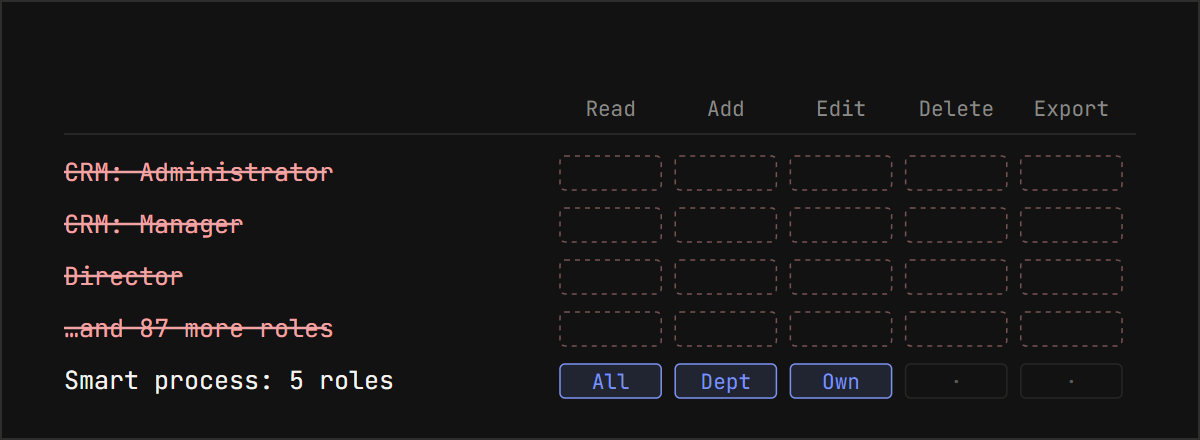
On the day of the platform upgrade, the internal help desk was buried in tickets: leads won't open, deals are gone, no access to the CRM. Of the long list of roles on the CRM permissions page, about five were left: the ones configured in a smart process.
Ninety roles had disappeared, nearly everything on that page, taking thousands of permission settings and hundreds of assignments to employees and departments with them. Among them were "CRM: Administrator", "CRM: Manager" and "Director". Everything came back within 90 minutes, and the surviving roles were not changed by a single row. And the cause turned out to be simple enough to hit any portal.
Access first, diagnosis second
While people can't open a customer record, there's no time to hunt for causes. The first move was a temporary role called "Everyone": view and create rights across the CRM for all employees, 232 settings. It's a blunt fix, since everyone now sees everything. But sales and support are working again, and the admin gets time to investigate without panic.
A role like that has a cost: it's easy to forget. Remove it deliberately, once you've confirmed the regular permissions are back and working.
Check the database, not the screen
The permissions page showed an almost empty list. Taken at face value, nearly everything was gone. The first database query gave a sharper picture: smart process roles and their settings were still in place. So the deletion was selective.
A breakdown by CRM section showed the extent. Leads were down to 6 settings rows out of 121. Orders, legacy invoices and events had none left. Smart process permissions were fully intact: they're configured on other pages, and a save on the general CRM page doesn't touch them. The roles that vanished were exactly the ones shown on that page.
That explains the almost empty screen. It wasn't the cause of the outage but the result: the section's roles were already deleted, and only the ones configured in a smart process remained.
Who clicked, and when
The Bitrix24 event log doesn't record CRM permission changes; it only shows user logins. The answer was in the web server log: a save request from an internal address arrived seven seconds before the page with the missing roles was opened. An admin had clicked Save.
Later, while reading the code, I found that the CRM keeps its own permissions log. For every deleted role it writes an entry with the ID of the user who deleted it. But it keeps entries for 30 days, and by the time I got to that log, they had expired.
Why a database rollback was off the table
The obvious move, restoring the database from a backup, didn't work here. A full rollback would have wiped everything employees had done since the backup: deals, tasks, conversations.
Rolling back just the permission tables wasn't possible either. During the outage, people had been creating and editing roles by hand, and seven new ones had appeared. A table rollback would have erased those too. So the task was: add only what's missing and overwrite nothing.
How we restored it in 90 minutes
What saved us was the nightly backup: the portal is backed up every day. We didn't need to restore it on a separate server. A MySQL table file from a backup can be attached to the live server as a temporary database:
CREATE DATABASE restore_copy;
CREATE TABLE restore_copy.b_crm_role_perms LIKE sitemanager.b_crm_role_perms;
ALTER TABLE restore_copy.b_crm_role_perms DISCARD TABLESPACE;
-- copy the .ibd file from the backup, chown to mysql
ALTER TABLE restore_copy.b_crm_role_perms IMPORT TABLESPACE;
The one condition is that the table structure hasn't changed since the backup. The CRM module wasn't part of the upgrade, so it lined up.
A script then inserted the 90 missing roles with their original IDs, settings and assignments. One transaction, no updates or deletes of existing rows, and a snapshot of the tables before the insert. After inserting, you have to clear the cache: otherwise the portal keeps showing the pre-restore state and it looks as if nothing happened.
Verification came last. The surviving roles were compared with the backup by content, not by counts: no rows missing and none added.
Why it happened
The admin had started working on roles before the upgrade, and the permissions tab stayed open. The platform was upgraded, but the browser kept running the old page script from its cache. Work on the roles continued in the same tab. The old script misread the data the server now returned in a new shape, and on save it sent 90 roles as deleted.
The new version's code backs this up. The server deletes only the roles whose IDs the page itself sends in a "deleted" list. Even an empty page would have sent an empty list, and nothing would have happened. On the new page, a role gets into that list only one way: the "Delete role" button above its column, followed by a confirmation popup. There's no way to delete 90 roles in one click there. So the list came from the old script.
This wasn't an admin mistake in the usual sense: they clicked the same button as always. What failed was a tab nobody reloaded after the portal was upgraded.
What to check on your portal
- After an upgrade, close old settings tabs and reload pages with a cache refresh (Ctrl+F5). Tell everyone who configures the portal to do the same. If a settings screen looks off, don't save anything.
- A daily database backup. Taking it isn't enough: you need to be able to pull a single table out of it instead of restoring the whole database. Here, that's what kept the fix to 90 minutes.
- Export the permissions matrix regularly: roles, settings, who they're assigned to. CRM permissions have no change history of their own, and an Excel export shows what things looked like before an incident.
- The CRM permissions log keeps entries for 30 days. The retention is set by the CRM module option
permissions_logger_ttl, in hours, 720 by default. If an investigation runs past a month, the answer to "who deleted it" disappears with the log. Raise the limit in advance.
Denis Eliseev, Bitrix24 administrator and integrator Telegram